Pickupdesk

For repair shops, dry cleaners, tailors, bike and watch shops

“Is it ready yet?”

Every shop that takes things in for repair answers the same call all day. Pickupdesk gives each customer a receipt with a QR code to follow their job, asks them to approve prices on their phone, and texts them the moment it is ready.

Start free

No app for your customers. Works on the counter computer and a phone.

Time spent on status calls

Move the sliders to match your counter.

Hours a month on the phone

0

Your own estimate, not a promise. Most of these calls stop when customers can check for themselves.

Book it in, print the receipt, let customers follow along

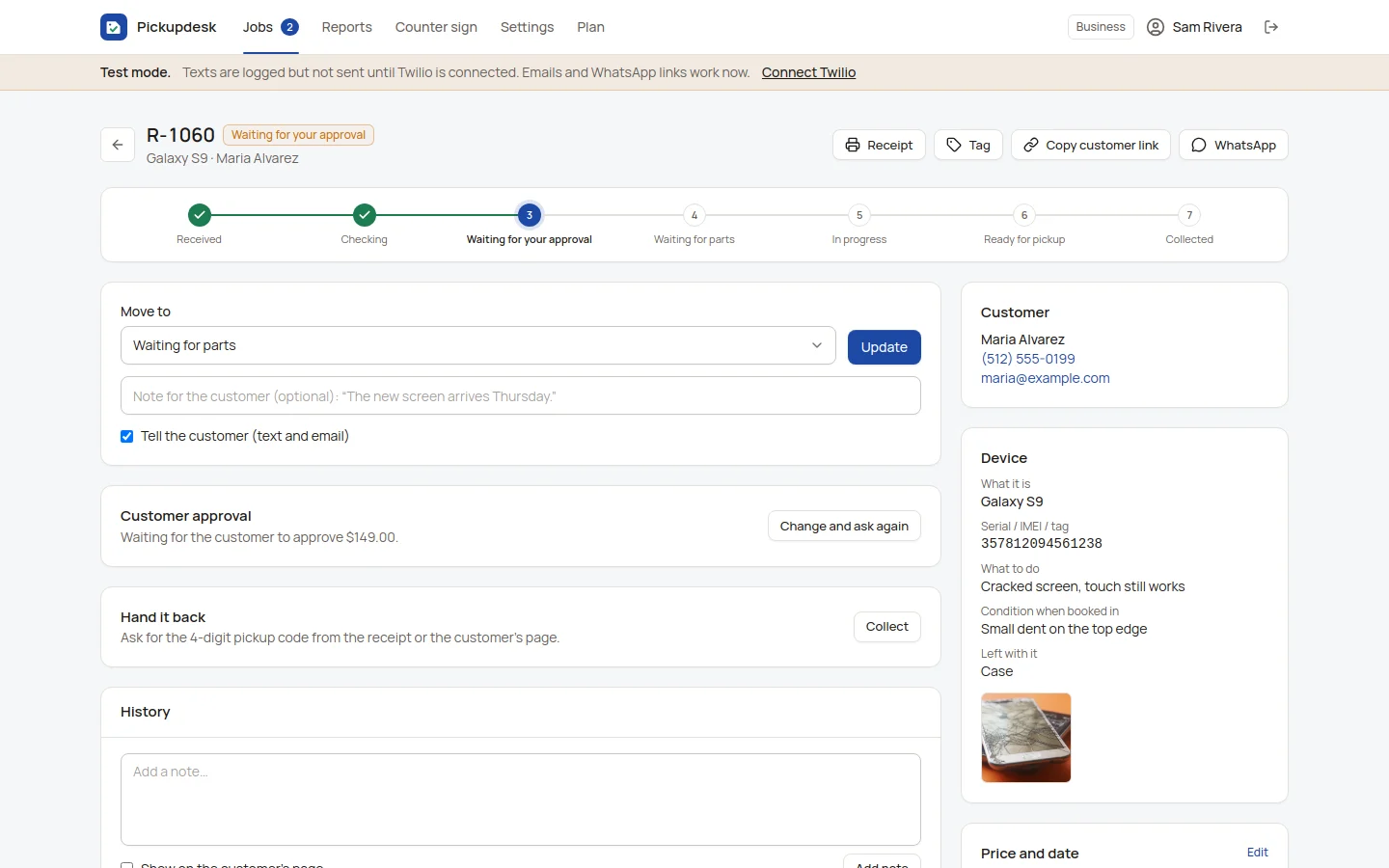
Each item gets a number, a printed receipt with a QR code and a tag. Move it through your own steps; customers see every step on their phone, approve estimates there, and get a text with a pickup code when it is ready.

A repair job: the steps, the approval card, the pickup form and the history

How it works

  1. 01

    Book it in

    Customer, item, serial number, what to do, condition, photos, estimate and deposit. A returning customer fills in from their phone number.

  2. 02

    Update as you work

    Checking, waiting for parts, in progress: one click, with a note if you like. Ask the customer to approve a price on their phone.

  3. 03

    Text when ready

    They get a text and an email with the balance and a 4-digit pickup code. Uncollected items get a reminder.

Made for the counter

Printed receipt and tag
A4, Letter or an 80 mm receipt printer, with your terms, the QR code and the pickup code. A small tag for the item.
Customer status page
Every step, updates from you, the price and the balance, without an app or an account.
Estimate approval
Send a price; the customer approves or declines on their phone, and you get an email.
Your own steps
Rename them, switch off what you don’t use, add your own, and choose which ones text the customer.
Texts on your own Twilio
Plus emails, and one-tap WhatsApp messages from the job page. Test mode until Twilio is connected.
Pickup code
A 4-digit code on the receipt and the customer’s page, asked before an item is handed over.
Uncollected reminders
A reminder a few days after an item is ready, up to three times.
Check my repair page
Ticket number and last 4 phone digits for customers who lost their receipt. A sign to print for the counter.
Reports and export
Booked in, collected, average time to ready, what is on the shelf, and a CSV of every job.
Simple plans

Start free. Each shop texts through its own Twilio account and pays Twilio directly.

Free

Free

For a small counter.

  • 40 jobs a month
  • 50 texts a month
  • Receipts with QR code, customer page, approvals, reminders, reports
Start free

Pro

$15 / month

For one busy shop.

  • 600 jobs a month
  • 1,500 texts a month
  • Receipts with QR code, customer page, approvals, reminders, reports
  • Intake photos
  • No platform name on your pages and emails
Start free

Business

$39 / month

High volume, no limits.

  • Unlimited jobs
  • Unlimited texts
  • Receipts with QR code, customer page, approvals, reminders, reports
  • Intake photos
  • No platform name on your pages and emails
Start free

Questions

Do customers need an app?

No. They open the link from the receipt’s QR code, the text or the email in their phone’s browser.

What does texting cost?

Texts go through your own Twilio account, about a cent each in the US. Without Twilio, emails and WhatsApp messages still work.

Can I use it for things other than phone repair?

Yes. Rename the steps and what you take in: garments, shoes, bikes, watches, jewellery, frames, appliances.

Can I print on a receipt printer?

Yes: the receipt has a full-page layout and an 80 mm layout, and the tag prints on 62 × 40 mm labels.

Is it in other languages?

The customer’s page, messages and receipts can be in English, Spanish or French, per shop.

Stop answering “is it ready?”

Book in your first job in a minute. Free to start, no card needed.

Start free